Category: Backend

10 things should be avoided as a javascript developer

As a JavaScript developer, it is important to keep in mind the best practices and avoid certain common pitfalls in order to write efficient and maintainable code. Here are ten things that you should avoid as a JavaScript developer

1. Overuse of global variables:

Using too many global variables can make it difficult to keep track of the state of your application and can lead to name collisions. Instead, try to use modules and closure to keep your variables within a well-defined scope

// Avoid this
let userName = "John Doe";
let userAge = 30;
let userAddress = "123 Main St.";

// Instead, use modules
const userModule = (() => {
let name = "John Doe";
let age = 30;
let address = "123 Main St.";

return {
getUser: () => ({ name, age, address })
};
})();

// Usage
console.log(userModule.getUser());

In this example, instead of having three global variables, they are all scoped within the userModule closure. This makes the state of the application easier to manage and reduces the risk of name collisions.

2. Blocking the UI thread:

JavaScript is single-threaded, which means that long-running tasks can freeze the user interface. To avoid this, try to use Web Workers or asynchronous functions to run intensive tasks in the background.

// Avoid this
for (let i = 0; i < 1000000000; i++) {
// Do something intensive
}

// Instead, use Web Workers
const worker = new Worker("./worker.js");
worker.postMessage({ data: "Hello, Worker!" });

3. Neglecting cross-browser compatibility:

Not all browsers implement the same features or behave in the same way. Be sure to test your code on multiple browsers and use feature detection or polyfills to ensure compatibility

// Avoid this
const result = new Map().values();

// Instead, use feature detection or polyfills
if (typeof Map.prototype.values === "function") {
const result = new Map().values();
} else {
// Implement polyfill
}

4. Writing complex code:

Simple code is often easier to read, understand, and maintain. Try to write small, focused functions that do one thing well, and use descriptive functions and variable names to make your code self-explanatory

// Avoid this
const complexFunction = (input) => {
let output = input;
for (let i = 0; i < input.length; i++) {
output = output.slice(0, i) + output.slice(i + 1);
}
return output;
};

// Instead, write simple code
const reverseString = (input) => input.split("").reverse().join("");

5. Not using strict mode:

Strict mode is a mode in JavaScript that makes it easier to write secure and reliable code. Enable strict mode by adding “use strict”; at the top of your script or function.

// Avoid this
function doSomething() {
// Not in strict mode
}

// Instead, use strict mode
function doSomething() {
"use strict";
// In strict mode
}

6. Ignoring performance considerations:

performance is important, especially on mobile devices and low-end hardware. Be mindful of the performance implications of your code, and use tools like the browser’s performance profiler to identify and optimize slow code.

// Avoid this
const slowFunction = (input) => {
let result = 0;
for (let i = 0; i < input.length; i++) {
result += input[i];
}
return result;
};

// Instead, consider performance
const fastFunction = (input) => input.reduce((a, b) => a + b, 0);

7. Not handling errors:

Failing to handle errors can lead to unexpected behavior and make it difficult to diagnose and fix problems. Use try-catch blocks and throw meaningful error messages to handle errors and make debugging easier.

// Avoid this
const unreliableFunction = (input) => {
return input.split("/");
};

// Instead, handle errors
const reliableFunction = (input) => {
try {
return input.split("/");
} catch (error) {
throw new Error(`Cannot split string: ${error.message}`);
}
};

8. Not keeping up with best practices and new features:

Not keeping up with best practices and new features: The JavaScript language and its ecosystem are constantly evolving. Stay up-to-date with the latest best practices and new features by reading blogs and following industry leaders.

// Avoid this
const oldWay = (input) => {
let result = 0;
for (let i = 0; i < input.length; i++) {
result += input[i];
}
return result;
};

// Instead, use new features
const newWay = (input) => input.reduce((a, b) => a + b, 0);

9. Overusing this keyword:

The value of this in JavaScript can be confusing, especially in complex code. Try to use arrow functions, bind, call, and apply to explicitly set the value of this, or use functional programming techniques to avoid it altogether.

// Avoid this
const user = {
name: "John Doe",
age: 30,
address: "123 Main St.",
getUserInfo: function() {
console.log(`Name: ${this.name}`);
console.log(`Age: ${this.age}`);
console.log(`Address: ${this.address}`);
}
};

// Instead, use destructuring
const user = {
name: "John Doe",
age: 30,
address: "123 Main St."
};

const getUserInfo = ({ name, age, address }) => {
console.log(`Name: ${name}`);
console.log(`Age: ${age}`);
console.log(`Address: ${address}`);
};

// Usage
getUserInfo(user);

10. Writing spaghetti code:

Spaghetti code is code that is hard to follow, understand, and maintain. Write clean and well-organized code, and use comments, indentation, and whitespace to make your code readable and understandable.

// Avoid this
function fetchData() {
let data = null;
makeApiCall().then(res => {
data = res;
if (data.status === 200) {
// do something with the data
} else {
// handle error
}
});
}

// Instead, use a clean and modular approach
async function fetchData() {
try {
const res = await makeApiCall();
if (res.status !== 200) {
throw new Error("Failed to fetch data");
}
// do something with the data
} catch (error) {
// handle error
}
}

Advanced Techniques for Detecting Memory Leaks in Node.js Applications

Memory leaks can be a serious issue in any application, and Node.js is no exception. In this post, we’ll explore some common causes of memory leaks in Node.js applications and how to detect and fix them.

What is a Memory Leak?

A memory leak occurs when an application allocates memory but fails to release it when it’s no longer needed. This can cause the application to consume more and more memory over time, eventually leading to performance issues or even crashes.

In the diagram above, we can see how a memory leak can cause an application to consume more and more memory over time. As the application continues to allocate memory without releasing it, the amount of memory used by the application grows until it eventually causes problems.

Common Causes of Memory Leaks in Node.js

There are several common causes of memory leaks in Node.js applications. Some of the most common include:

1. Global Variables

Global variables can easily cause memory leaks if they’re not managed properly. If you’re using global variables, make sure to clean them up when they’re no longer needed.

Here’s an example of how a global variable can cause a memory leak:

// This global variable will never be cleaned up
let myGlobalVariable = [];

function myFunction() {
// This data will be added to the global variable
// every time the function is called
myGlobalVariable.push(someData);
}

// This will cause the global variable to grow
// every time the function is called
myFunction();
myFunction();
myFunction();

In this example, we have a global variable myGlobalVariable that is never cleaned up. Every time we call myFunction, we add more data to this global variable. Over time, this can cause the global variable to grow and consume more and more memory.

2. Event Listeners

Event listeners can also cause memory leaks if they’re not removed when they’re no longer needed. Make sure to remove event listeners when they’re no longer needed.

Here’s an example of how an event listener can cause a memory leak:

// This event listener will never be removed
document.addEventListener('click', () => {
// This code will be executed every time
// the document is clicked
doSomething();
});

In this example, we have an event listener that is never removed. Every time the document is clicked, the doSomething function is called. Over time, this can cause the event listener to consume more and more memory.

3. Closures

Closures can also cause memory leaks if they’re not managed properly. Make sure to only keep references to the data that’s actually needed by the closure.

Here’s an example of how a closure can cause a memory leak:

function createClosure() {
let largeData = [];

// This closure will keep a reference to largeData
return () => {
// This code will be executed every time
// the closure is called
doSomethingWith(largeData);
};
}

// This will create a closure that keeps
// a reference to largeData
let myClosure = createClosure();

// This will call the closure and execute
// the code inside it
myClosure();

In this example, we have a closure that keeps a reference to largeData. Every time we call myClosure, we execute the code inside the closure that uses largeData. Over time, this can cause the closure to consume more and more memory.

Detecting Memory Leaks

There are several tools and techniques you can use to detect memory leaks in your Node.js applications. Some of the most common include:

1. Heap Snapshots

You can use heap snapshots to see how much memory your application is using and where that memory is being allocated. This can help you identify potential memory leaks.

Here’s an example of how you might use heap snapshots to detect a memory leak in a Node.js application:

const heapdump = require('heapdump');
const fs = require('fs');

// Take a heap snapshot
heapdump.writeSnapshot((err, filename) => {
if (err) {
console.error(err);
} else {
console.log(`Heap snapshot written to ${filename}`);
}
});

// Load the heap snapshot
const snapshot = heapdump.readFileSync(filename);

// Analyze the heap snapshot
const topConsumers = snapshot.getTopConsumers();

// Log the top consumers
console.log(topConsumers);

In this example, we’re using the heapdump module to take a heap snapshot of our application. We then load the snapshot and use it to analyze our application’s memory usage. Finally, we log the top consumers of memory in our application.

2. Profiling

Profiling tools can help you identify which parts of your code are using the most memory. This can help you pinpoint potential memory leaks.

Here’s an example of how you might use profiling to detect a memory leak in a Node.js application:

const inspector = require('inspector');

// Start the profiler
const session = new inspector.Session();
session.connect();
session.post('Profiler.enable', () => {
session.post('Profiler.start', () => {
// Run your code here
doSomething();

// Stop the profiler
session.post('Profiler.stop', (err, { profile }) => {
// Log the profile data
console.log(profile);
});
});
});

In this example, we’re using the inspector module to start a profiling session. We then run our code and stop the profiler when we’re done. Finally, we log the profile data to see which parts of our code are using the most memory.

3. Logging

You can also use logging to track memory usage over time. This can help you identify trends and patterns that may indicate a memory leak.

Here’s an example of how you might use logging to detect a memory leak in a Node.js application:

// Log the memory usage every second
setInterval(() => {
const memoryUsage = process.memoryUsage();
console.log(memoryUsage);
}, 1000);

In this example, we’re using setInterval to log our application’s memory usage every second. Over time, we can analyze these logs to see if there are any trends or patterns that may indicate a memory leak.

Fixing Memory Leaks

Once you’ve identified a potential memory leak, there are several steps you can take to fix it. Some common techniques include:

1. Refactoring Your Code

In many cases, refactoring your code to avoid common causes of memory leaks (such as global variables and event listeners) can help fix the issue.

Here’s an example of how you might refactor your code to avoid a memory leak caused by a global variable:

// Instead of using a global variable,
// pass the data as an argument
function myFunction(someData) {
// Use the data passed as an argument
doSomethingWith(someData);
}

// Pass the data as an argument
myFunction(someData);

In this example, we’ve refactored our code to avoid using a global variable. Instead of storing our data in a global variable, we pass it as an argument to myFunction. This allows us to avoid the memory leak caused by the global variable.

2. Using a Garbage Collector

Node.js has a built-in garbage collector that can help clean up unused memory. Make sure your code is structured in a way that allows the garbage collector to do its job effectively.

Here’s an example of how you might structure your code to allow the garbage collector to clean up unused memory:

function myFunction() {
// Allocate some memory
let someData = [];

// Use the data
doSomethingWith(someData);

// Allow the garbage collector to clean up
// the unused memory
someData = null;
}

myFunction();

In this example, we’ve structured our code in a way that allows the garbage collector to clean up unused memory. After we’re done using someData, we set it to null. This allows the garbage collector to reclaim the memory used by someData.

3. Monitoring Your Application

Finally, make sure to monitor your application for signs of memory leaks. This will help you catch any issues early on and fix them before they become serious problems.

Here’s an example of how you might monitor your application for signs of memory leaks:

// Monitor the application for signs of memory leaks
setInterval(() => {
const memoryUsage = process.memoryUsage();

// Check if the heapUsed value is growing over time
if (memoryUsage.heapUsed > someThreshold) {
// There may be a memory leak
console.warn('Potential memory leak detected!');
}
}, 1000);

In this example, we’re using setInterval to monitor our application for signs of memory leaks. Every second, we check if the heapUsed value is growing over time. If it is, we log a warning message indicating that there may be a potential memory leak.

In this post, we’ve explored some common causes of memory leaks in Node.js applications and how to detect and fix them. By understanding these causes and using the tools and techniques we’ve discussed, you can help prevent memory leaks in your own Node.js applications.

Thank you for reading! I hope this post has been helpful and informative. If you have any questions or comments, please feel free to leave them below.

Common Problems in Message Queues [With Solutions]

Queue : A message queue is a service that allows applications to send and receive messages/events. They provide a way for applications to communicate asynchronously and decouple the sending and receiving of messages, allowing for more flexible and scalable systems.

Problems:

Queue-based systems are widely used for asynchronous communication and message processing, but they can encounter a variety of issues that can affect their performance and reliability. Some common issues that can occur in queue-based systems include:

  • Message loss: Messages can be lost due to network failures, system crashes, or other unexpected events.
  • Message ordering: In a distributed system, messages may not be received in the same order they were sent, which can cause issues when processing the messages.
  • Poison messages: Poison messages are messages that cannot be processed by the consuming application due to errors such as format errors, missing dependencies, or application errors. These messages can block the processing of other messages in the queue, causing delays and other problems.
  • Overload: Queue-based systems can become overwhelmed if the rate of incoming messages exceeds the system’s ability to process them. This can lead to high memory usage, slow performance, and even system crashes.
  • High latency: Queue-based systems can experience high latency due to long processing times, large message sizes, or network congestion.

Solution to Common Problems:

Solving Queue Overloading :

  1. Implement backpressure: By implementing backpressure, the message queue can slow down or stop accepting messages when it becomes overloaded, preventing the queue from becoming overwhelmed.
  2. Use multiple queues: By using multiple queues, different types of messages can be processed in parallel, reducing the likelihood of a single queue becoming overloaded.
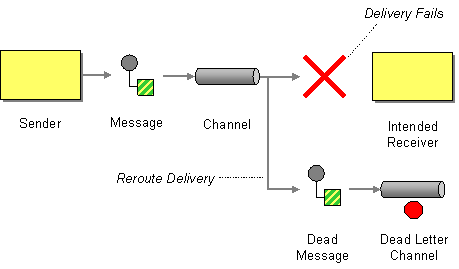
  3. Use a dead-letter queue: A dead-letter queue is a queue that holds messages that cannot be processed by a consumer, it can be used to hold messages that are not critical and can be processed later, or that are blocked because of a problem.
  4. Implement retry mechanism: Implementing a retry mechanism for failed messages can help reduce the number of messages in the queue and improve the overall performance of the system.

Others: Monitor the queue for actual problems, Scale the queue

Solving Poison Messages:

https://www.enterpriseintegrationpatterns.com/patterns/messaging/RequestReply.html

Use DLQ : A dead letter queue (DLQ) is a queue used to hold messages that cannot be successfully processed by the consuming application. These messages may be undeliverable due to a variety of reasons, such as format errors, missing dependencies, or application errors.

The purpose of a DLQ is to provide a mechanism for isolating and handling problematic messages, so that they do not block the processing of other messages in the main queue. Once a message is placed in a DLQ, it can be examined and potentially re-processed, or discarded if it is determined to be unimportant or unprocessable. This process of handling a message in DLQ is also known as poison message handling.

DLQs are commonly used in message-oriented middleware systems, such as RabbitMQ and Kafka etc. DLQs can be implemented in different ways, but typically, they are associated with a primary queue, and a message will be moved to the DLQ if it cannot be successfully processed by the consuming application after a certain number of retries.

Solving Message Loss:

  1. Implement acknowledgement: Acknowledgement is a mechanism that allows the consumer to confirm that it has received and processed a message. This can be used to ensure that messages are not lost if the consumer crashes or is disconnected.
  2. Use persistence: Persistence is a mechanism that allows messages to be stored on disk, rather than in memory. This ensures that messages are not lost if the message queue is restarted or if there is a power outage.
  3. Use replication: Replication is a mechanism that allows messages to be replicated across multiple servers. This ensures that messages are not lost if one of the servers goes down.
  4. Use a transaction: using a transaction to handle message enqueue and dequeue can help ensure that a message is not lost if the dequeue process is failed.

Solving Large Data Volume:

  1. Use a distributed message queue: A distributed message queue allows messages to be stored and processed across multiple servers, allowing for greater scalability and the ability to handle large volumes of data.
  2. Use compression: Compressing the data before adding it to the queue can significantly reduce the amount of data that needs to be stored, allowing the message queue to handle larger volumes of data.
  3. Partition the data: By partitioning the data, it can be divided into smaller chunks, which can be processed separately, reducing the load on the message queue.
  4. Consider using a database/data lake: If the data volume is really large, using a database specifically designed to handle large data volume such as NoSQL database like Cassandra, MongoDB could be more suitable than using a message queue.

Others: Scaling, Monitoring..

Solving High Latency :

  1. Optimize network communication: By optimizing the network communication, such as using faster protocols or reducing the amount of data that needs to be sent over the network, the time it takes for messages to be delivered can be reduced, reducing latency.
  2. Cache: See if we can use a cache or in memory message queue like redis

Others: Scaling, Monitoring, distributed queue ..

Solving message ordering :

  1. Using a timestamp: By adding a timestamp to each message, messages can be sorted by their timestamp and processed in the order they were sent.
  2. Using a unique ID / sequence number : By assigning a unique ID to each message, messages can be sorted by their ID and processed in the order they were sent.
  3. Using a distributed log system like Apache Kafka, it uses a log-based storage system and each message is assigned an offset in the log. This allows for the messages to be read in the order they were written to the log.

Definition : Distributed message queue

A distributed message queue is typically built on top of a distributed architecture, which allows for the message queue to be spread across multiple servers, each running the message queue software. Each server can handle a portion of the message queue, and can communicate with the other servers to ensure that all messages are processed.

Some popular distributed message queue systems include Apache Kafka, RabbitMQ, Apache ActiveMQ and Amazon SQS

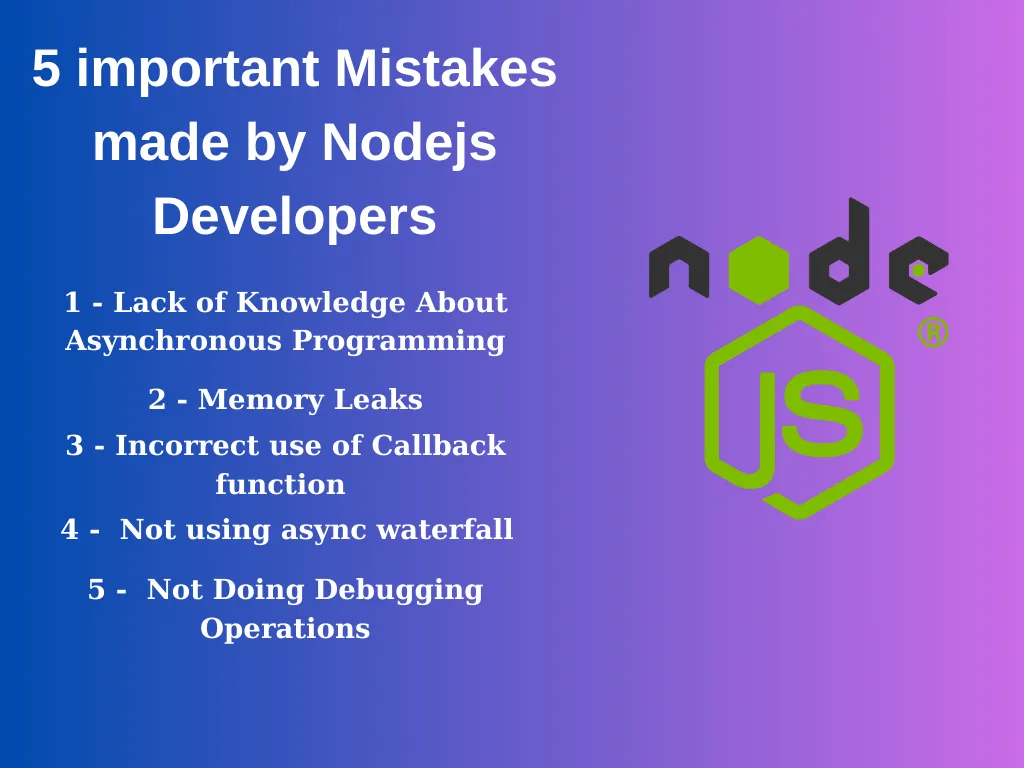
5 important Mistakes made by Nodejs Developers

  1. Lack of Knowledge About Asynchronous Programming : Developers who do not use asynchronous functions correctly can cause performance problems. Developers should be able to decide well what should work synchronously and asynchronously.
async function fetchData() {
try {
const response = await fetch('https://api.example.com/data');
const data = await response.json();
return data;
} catch (error) {
console.log('Error fetching data:', error);
}
}

fetchData().then((data) => {
console.log('Data fetched:', data);
}).catch((error) => {
console.log('Error:', error);
});

In this example, the fetchData function is defined with the async keyword, which allows us to use await to pause the execution of the function until the API request is completed. Once the data is retrieved, the await keyword is used again to extract the JSON data from the response.

The function returns the data, which is then logged to the console in the then block of a promise. If there is an error during the API request, the catch block will log the error to the console.

2. Memory Leaks : Node.js uses garbage collector to minimize memory leaks. However, developers’ code can have memory leaks, which can lead to performance issues.

The following example is we memory leak example:

function exampleData() {
const data = [];
// ...
data.push(newData);
// ...
return data;
}

setInterval(() => {
const result = exampleData();
console.log(result);
}, 1000);

This example causes the data array created by the exampleData function to be spooled in memory before being used in a function that repeats every second. This leads to a memory leak and negatively affects the performance of the program.

To fix this code, the created objects must be deleted from memory after use. Here is an updated version of the exampleData function from the previous example:

function exampleData() {
return new Promise((resolve, reject) => {
const data = [];
// ...
data.push(newData);
// ...
resolve(data);
});
}

setInterval(() => {
exampleData().then((result) => {
console.log(result);
}).catch((error) => {
console.log(error);
});
}, 1000);

The function now returns a Promise corresponding to the array, instead of returning an array.

The fetchData function is called on each call, the result is returned as a Promise object, and the result is automatically cleared by the garbage collector after it is used. This prevents memory leaks and improves the performance of the program.

3. Incorrect use of Callback function : The following example uses a callback function to read data from a file. However, if used incorrectly, this function can cause errors and become hard-to-read code:

const fs = require('fs');

function readDataFromFile(callback) {
const filePath = './data.txt';

fs.readFile(filePath, 'utf8', (err, data) => {
if (err) {
callback(err);
} else {
callback(null, data);
}
});
}

readDataFromFile((err, data) => {
if (err) {
console.error('Error:', err);
} else {
console.log('Data:', data);
}
});

In this example, the **readDataFromFile** function takes a **callback** function and reads data from a file via the **fs** module. However, this example is used incorrectly. The callback function is always called, even when an error occurs. This requires you to write more code to **catch** and handle errors.

Here is a corrected version of the above code:

const fs = require('fs');

function readDataFromFile(filePath, callback) {
fs.readFile(filePath, 'utf8', callback);
}

readDataFromFile('./data.txt', (err, data) => {
if (err) {
console.error('Error:', err);
} else {
console.log('Data:', data);
}
});

In this example, the readDataFromFile function is using it properly. The callback function is passed directly from fs.readFile and is handled on failure or when called successfully. This allows you to write less code and make the code more readable.

4. Not using async waterfall : Async waterfall is a function provided by “**async**“, a widely used asynchronous control flow library in Node.js. ****This function allows us to perform a series of actions sequentially, and after each action is completed it allows us to move on to the next action.

Using an async waterfall is especially useful when there are dependencies between processes. For example, there is a dependency between operations such as downloading a file, opening the file, and processing its contents, and we need to perform these operations sequentially.

Using the async waterfall allows us to perform operations sequentially and accurately and improves the readability of the code.

Here is an example:

const async = require('async');
const fs = require('fs');

async.waterfall([
function downloadFile(callback) {
// Download a file
// ...
callback(null, 'file.txt');
},
function processFile(filename, callback) {
// Read and process the file contents
fs.readFile(filename, 'utf8', (err, data) => {
if (err) {
callback(err);
return;
}
// Process the file contents
const processedData = data.toUpperCase();
callback(null, processedData);
});
},
function uploadFile(processedData, callback) {
// Upload the processed data to a server
// ...
callback(null, 'success');
}
], (err, result) => {
if (err) {
console.error('Error:', err);
return;
}
console.log('Result:', result);
});

In the example above, the async.waterfall function sequentially executes three operations, downloadFile, processFile, and uploadFile, which run depending on each other’s results.

The first process downloads a file and passes the filename to the second process. The second process reads and processes the contents of the file, then passes the result to the third process. The third operation uploads the processed data to the server and returns the result.

Each action depends on the result of the previous action and will only run after the previous action is complete. This allows us to perform operations sequentially and accurately.

5. Not Doing Debugging Operations: Below is an example of code written without error catching:

const fs = require('fs');

fs.readFile('myfile.txt', (data) => {
  console.log('File contents:', data);
});

console.log('Program ended');

In this example, if an error occurs, the program will simply crash and we won’t know what went wrong. Below is a more accurate example:

const fs = require('fs');

fs.readFile('myfile.txt', (err, data) => {
if (err) {
console.error('Error reading file:', err);
return;
}
console.log('File contents:', data);
});

console.log('Program ended');

© 2026 Different Blog

Theme by Anders NorenUp ↑